How to Translate Chinese Product Images to English
Localize Chinese e-commerce product images into English listings — specs, callouts, and infographics — while keeping the design, and verify every number before publishing.
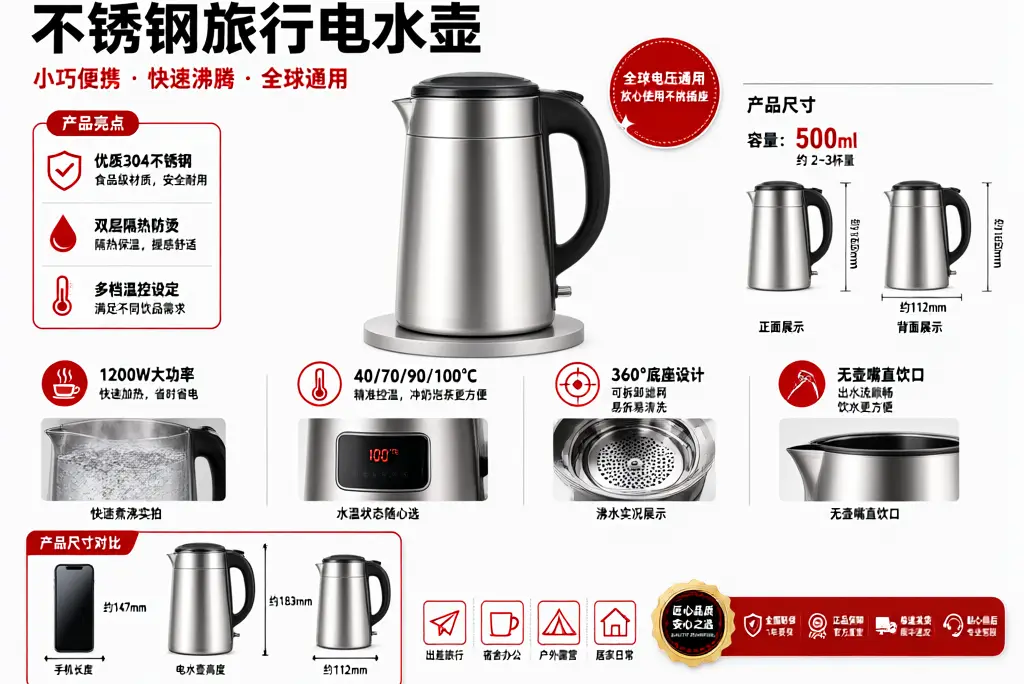
You can translate Chinese product images to English without redoing the design: upload the supplier's JPG, PNG, or WebP artwork, choose English as the target, and download the same image with every Chinese label — title, selling points, specifications, callouts — rendered in English at its original position. The product photo, colors, and layout stay as the supplier designed them.
This is the daily reality of cross-border selling: you source from 1688, Taobao, or a factory's WeChat catalog, and the only marketing assets that exist are Chinese infographics. Rebuilding them from scratch in a design tool costs days per listing; translating them in place costs minutes. The workflow below covers preparation, the elements that must survive translation untouched, and the verification pass that catches the mistakes that actually cost money — wrong numbers.
What is actually inside a Chinese product image
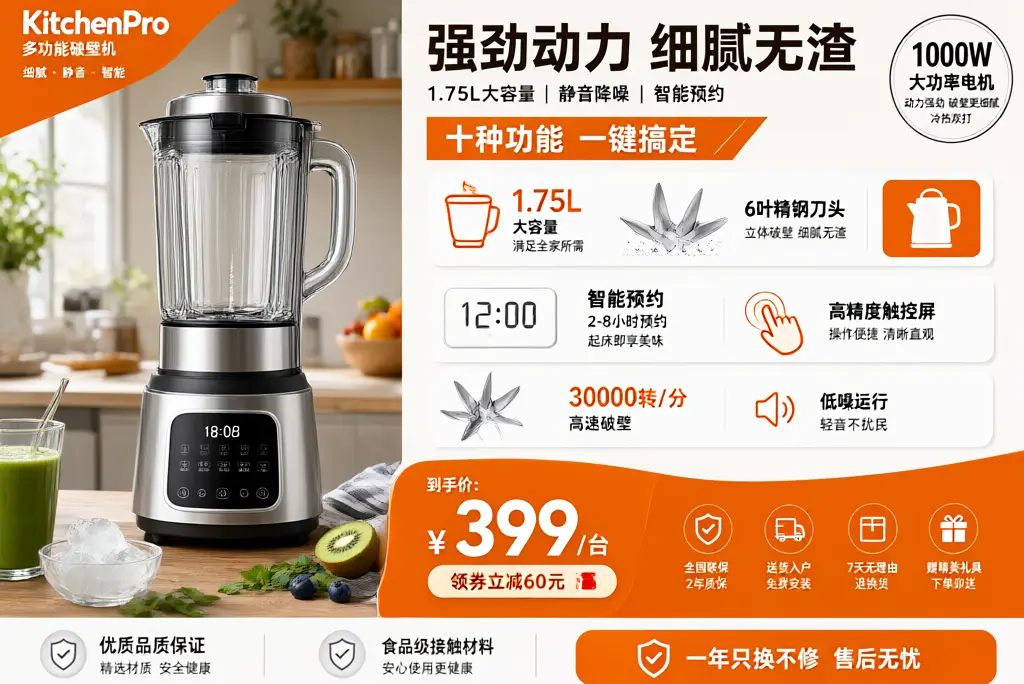
Supplier artwork is denser than a Western listing photo, which is why it pays to know the parts before translating:
- The main title block (主图标题) — product name plus a stack of qualifiers: material, capacity, key feature. It sits top-center and sets the tone for the whole image.
- Selling-point callouts (卖点标注) — three to six short claims arranged around the product, each with a line or arrow pointing at the feature it describes: "food-grade 304 stainless steel", "one-button open", "fits a cup holder".
- Specification blocks (参数表) — capacity, dimensions, weight, power, material. Numbers with units, the highest-risk zone in the whole image.
- Scene banners (场景条) — "for the office, for travel, for the gym" — lifestyle framing, usually at the bottom.
- Trust marks — certification logos, brand marks, store QR codes, customer-service contacts.
Items 1–4 translate well and are the point of the exercise. Item 5 is mixed: logos and certification marks should pass through untouched, while store QR codes and customer-service stickers usually have no place in an English listing and are better cropped out before translating.
Step-by-step: supplier artwork to English listing images
1. Curate and crop before translating
Work from the highest-resolution originals the supplier can send. For each image: crop off store watermarks, QR codes, and customer-service stickers; keep the callout lines and their labels together; and split very long scrolling detail pages into screen-sized sections — recognition and review are both better on well-framed images than on one endless banner.
2. Run the first image as a pilot
Open the translation workspace, upload one representative image, keep English as the target, and submit. The pilot answers three questions cheaply: whether the supplier's file quality survives OCR, whether the callout style renders cleanly in English, and roughly how much editing the set will need. A standard-quality translation costs 10 credits per image per target language (high quality, 20) — a pilot is the cheapest possible way to learn what the other forty images will do.
3. Translate the full set as a batch
Once the pilot looks right, upload the rest together in batch mode and translate the set in one job — the finished images download as a ZIP with their names intact. If the same artwork also needs a German or Spanish storefront, eligible plans add target languages per image; each image-and-language combination is billed separately, so the estimate shown before submitting is the number that matters.
4. The number pass — the step that protects your margin
Go through every image and compare, one by one against the original:
- Capacity and volume. 500ml must stay 500 ml — not become 500 oz, not lose a zero, not gain one.
- Dimensions. Compare each figure in the size chart; a digit swap turns a shipping dispute into a returns queue.
- Power and electrical ratings — for appliances, these numbers are safety information.
- Units. Translation swaps the language of the unit, not the measurement system: 毫升 becomes ml, not ounces. If your marketplace expects local units, convert them deliberately, in the editor, once — never let an ambiguous figure reach the listing.
- Sets and quantities. "6-piece set" should stay six, including when the original said 六件套.
5. Edit regions for fit, not just correctness
English is usually shorter than Chinese for the same claim — the opposite of the German problem — but callouts are still tight spaces. In the result editor, prefer the shorter phrasing that fits the region: "leak-proof lid" over "the lid has been engineered to prevent any leakage". A callout that overflows its box breaks the tidy look that made the supplier artwork worth keeping.
6. Export, then file the pair
Download the English set as PNGs. In your asset folder, store each English image next to its Chinese original — the original is your permanent reference when a customer disputes a specification, and the source to re-run when the supplier revises the artwork.
Elements that must survive translation untouched
Some things in supplier artwork should never be translated, overwritten, or cropped away:
- Brand names and model numbers. These identify the product across every channel; a translated model code breaks inventory matching.
- Certification marks (CE, FCC, CCC, and the like). They are graphics and pass through as such — keep them visible and unaltered; they are also a reason not to crop carelessly.
- The product photo itself. Only the lettering changes; the photograph of the product must remain exactly what the supplier shot.
- Patent and regulatory text, where present: translate for your own understanding, but confirm the legal wording with a qualified source before reusing it in a listing.
One planning note for marketplace sellers: each platform has its own rules on image language, certification display, and claims wording. The workflow above produces faithful translated images; platform compliance is a separate checklist you apply on top, per marketplace.
Why not just extract the text and rebuild in a design tool?
For a handful of hero images, rebuilding is defensible — full brand control, original typography. For a catalog, it is not competitive: extraction gives you a text file whose positions you then re-place by hand, one label at a time, while in-place translation returns a finished layout per image. Most sellers land on a hybrid: in-place translation for the long tail of detail images, and manual design only for the handful of top-of-listing heroes.
Frequently asked questions
Will charts and size tables inside the image be translated? Yes — a size chart is a set of text regions like any other, and the translated values are placed back into the table cells. Because tables are number-dense, they deserve the most careful pass in step 4.
What about Traditional Chinese or Japanese sourcing documents? The same workflow applies: choose English as the target and the source script is detected automatically — Traditional Chinese artwork from Taiwan or Hong Kong suppliers and Japanese packaging translate the same way.
Can I translate the same artwork into several storefront languages? Yes. Eligible plans allow several target languages per image; each image-and-language combination is billed separately (10 credits each at standard quality), and the results export per job.
Keep going
- Load a sample and try it — the workspace is on the home page.
- The general method behind this workflow: how to translate text in an image without changing the layout.
- Translating a whole catalog at once: how to translate multiple images at once.
- Credits, batch caps, and target-language limits per plan: pricing.